Stored Video Analysis (async)
Introduction
Sightengine's Video API is entirely automated — which makes it very fast and scalable — and it is completely customizable, so that you can define your own rules and pick the models you need, whether you want to moderate content, detect AI-generated videos, spot deepfakes or run any other model.
Here are the steps to analyze a stored video:
- Your back-end submits a video to the Sightengine API
- Sightengine analyzes the video, and creates alerts each time relevant content is detected
- Your back-end receives callbacks (a.k.a. webhooks) to inform you of the results. You can also poll Sightengine to ask for status updates, progress and results
This guide has been designed to help you analyze stored videos. For live streams and live videos, head to our Live Analysis Guide.
Get API access credentials
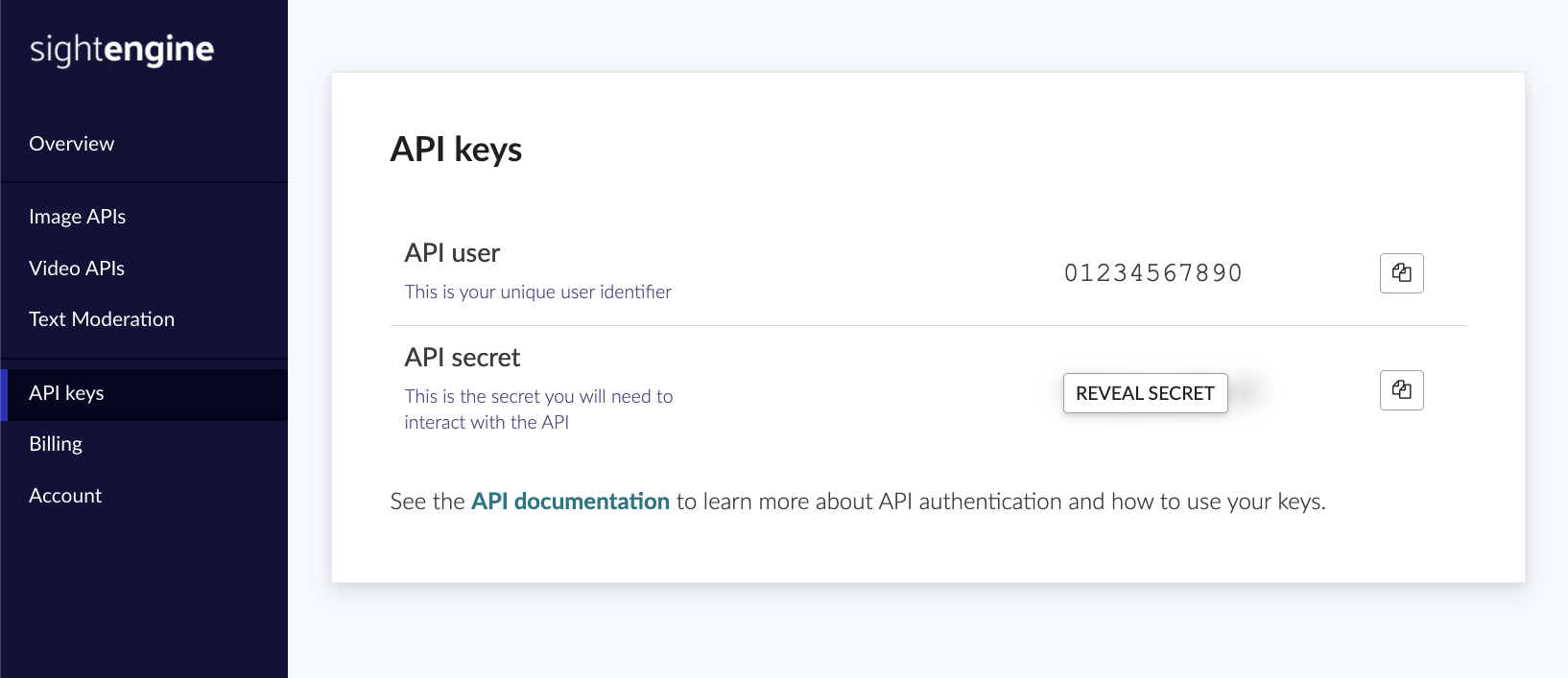
The Sightengine API uses a key pair that consists of an API user id and an API secret for authentication. To get your own API credentials, create an account and go the the API key page to retrieve them.
Pick your Models
Sightengine has a long list of models that you can pick and choose from. A model is a video recognition engine designed for a specific task — spotting unwanted content, detecting AI-generated videos, spotting deepfakes and more.
Here are our most popular models for video analysis:
| nudity-2.1 | Detect all types of nudity and sexual content. Pornography, X-rated nudity, partial nudity, suggestive scenes and poses, lingerie... More |
| violence | Detect physical violence, threats and more More |
| offensive | Detect offensive and hateful signs, symbols, flags and gestures. More |
| weapon | Detect weapons, firearms and threatening knives More |
| face-analysis | Analyze face quality, obstruction, angle, sunglasses etc More |
| gore-2.0 | Detect horrific imagery including scenes with blood, wounds, self-harm, guts... More |
| recreational_drug | Detect recreational and medical drugs More |
| alcohol | Detect wine, beer, cocktails, spirits. More |
| gambling | Detect gambling, casinos, slot machines... More |
| tobacco | Detect smoking and tobacco products More |
| money | Detect displays of money and banknotes More |
| self-harm | Detect self-harm More |
| genai | Detect if a video was AI-generated More |
The full list of models along with details is available in the Model Reference.
Submit a Video to Sightengine
To analyze a video, you can either submit its raw bytes to the API or submit a URL if the video can be downloaded through a URL.
Send the raw bytes
Send it through a POST request to Sightengine, along with the list of models.
curl -X POST 'https://api.sightengine.com/1.0/video/check.json' \
  -F 'media=@/path/to/your/video.mp4' \
  -F 'models=nudity' \
  -F 'callback_url=https://yourcallback/path' \
  -F 'api_user={api_user}' \
  -F 'api_secret={api_secret}'
# this example uses requests
import requests
import json

params = {
  # specify the models you want to apply
  'models': 'nudity',
  # specify where you want to receive result callbacks
  'callback_url': 'https://yourcallback/path',
  'api_user': '{api_user}',
  'api_secret': '{api_secret}'
}
files = {'media': open('/path/to/your/video.mp4', 'rb')}
r = requests.post('https://api.sightengine.com/1.0/video/check.json', files=files, data=params)

output = json.loads(r.text)
$params = array(
  'media' => new CurlFile('/path/to/your/video.mp4'),
  // specify the models you want to apply
  'models' => 'nudity',
  // specify where you want to receive result callbacks
  'callback_url' => 'https://yourcallback/path',
  'api_user' => '{api_user}',
  'api_secret' => '{api_secret}',
);

// this example uses cURL
$ch = curl_init('https://api.sightengine.com/1.0/video/check.json');
curl_setopt($ch, CURLOPT_POST, true);
curl_setopt($ch, CURLOPT_RETURNTRANSFER, true);
curl_setopt($ch, CURLOPT_POSTFIELDS, $params);
$response = curl_exec($ch);
curl_close($ch);

$output = json_decode($response, true);
// this example uses axios and form-data
const axios = require('axios');
const FormData = require('form-data');
const fs = require('fs');

data = new FormData();
data.append('media', fs.createReadStream('/path/to/your/video.mp4'));
// specify the models you want to apply
data.append('models', 'nudity');
// specify where you want to receive result callbacks
data.append('callback_url', 'https://yourcallback/path');
data.append('api_user', '{api_user}');
data.append('api_secret', '{api_secret}');

axios({
  method: 'post',
  url:'https://api.sightengine.com/1.0/video/check.json',
  data: data,
  headers: data.getHeaders()
})
.then(function (response) {
  // on success: handle response
  console.log(response.data);
})
.catch(function (error) {
  // handle error
  if (error.response) console.log(error.response.data);
  else console.log(error.message);
});
The above call works for videos that are no larger than 50MB. If you need to analyze a larger video, you should first upload it separately to the Upload API, and then submit the media id to the API.
Send the URL
Send it through a GET request to Sightengine, along with the list of models.
curl -X GET -G 'https://api.sightengine.com/1.0/video/check.json' \
    --data-urlencode 'stream_url=https://yourvideo/path' \
    -d 'models=nudity' \
    -d 'callback_url=https://your.callback.url/path' \
    -d 'api_user={api_user}' \
    -d 'api_secret={api_secret}'
# this example uses requests
import requests
import json

params = {
  'stream_url': 'https://yourvideo/path',
  # specify the models you want to apply
  'models': 'nudity',
  # specify where you want to receive result callbacks
  'callback_url': 'https://your.callback.url/path',
  'api_user': '{api_user}',
  'api_secret': '{api_secret}'
}
r = requests.post('https://api.sightengine.com/1.0/video/check.json', data=params)

output = json.loads(r.text)
$params = array(
  'stream_url' => 'https://yourvideo/path',
  // specify the models you want to apply
  'models' => 'nudity',
  // specify where you want to receive result callbacks
  'callback_url' => 'https://your.callback.url/path',
  'api_user' => '{api_user}',
  'api_secret' => '{api_secret}',
);

// this example uses cURL
$ch = curl_init('https://api.sightengine.com/1.0/video/check.json');
curl_setopt($ch, CURLOPT_POST, true);
curl_setopt($ch, CURLOPT_RETURNTRANSFER, true);
curl_setopt($ch, CURLOPT_POSTFIELDS, $params);
$response = curl_exec($ch);
curl_close($ch);

$output = json_decode($response, true);
// this example uses axios and form-data
const axios = require('axios');
const FormData = require('form-data');
const fs = require('fs');

data = new FormData();
data.append('stream_url', 'https://yourvideo/path');
// specify the models you want to apply
data.append('models', 'nudity');
// specify where you want to receive result callbacks
data.append('callback_url', 'https://your.callback.url/path');
data.append('api_user', '{api_user}');
data.append('api_secret', '{api_secret}');

axios({
  method: 'post',
  url:'https://api.sightengine.com/1.0/video/check.json',
  data: data,
  headers: data.getHeaders()
})
.then(function (response) {
  // on success: handle response
  console.log(response.data);
})
.catch(function (error) {
  // handle error
  if (error.response) console.log(error.response.data);
  else console.log(error.message);
});
If you provide a URL to an external domain, there might be cases where Sightengine is unable to retrieve the video file. The host may decide to rate-limit or block our servers. We therefore advise against using URLs under domains that you do not control
Retrieve the media id
The JSON response contains the media id for your video. The media id is a string that starts with med_
{
    "status": "success",
    "request": {
        "id": "req_1ML249NoEZ8j12op9Lipg",
        "timestamp": 1508774201.3177
    },
    "media": {
        "id": "med_1ML2wKmVgucuNPBN6xT33",
        "uri": "https://yourvideo/path"
    },
    "callback": "https://yourcallback/path"
}
In the above example, med_1ML2wKmVgucuNPBN6xT33 is the media id you should store to monitor the progress of this moderation job.
Next steps
Once Sightengine starts analyzing a video, you can retrieve the results in realtime through two separate channels: either through callbacks (this is the recommended approach as it is more efficient and faster) or by polling the API.