Two New Tools for Image Forensics: Online C2PA Checker and EXIF Metadata Viewer
The ability to investigate a piece of media (where does it come from, when was it last edited, is its content real or fake...) is crucial in many domains. Today, we are releasing two new free online tools, alongside our AI detection tool, to help journalists, fact-checkers, trust & safety teams and fraud analysts.
Both tools run in your browser and require no account. Drag a file in, read the result:
- Online C2PA Checker: read and validate the content credentials embedded in an image.
- Online EXIF Metadata Viewer: inspect every metadata field a file carries, from camera and timestamps to GPS and editing software.
Why provenance and metadata matter
Authenticity is rarely a single yes/no. The strongest investigations cross-reference several independent signals, and provenance metadata is one of the most valuable when present:
- Content credentials (C2PA) tell you what a file claims about itself: which tool created it, whether it was AI-generated, who signed it, and whether it has been altered since signing.
- EXIF and embedded metadata carry additional information, such as the camera or software used, when it was taken, and sometimes where.
Used together with pixel-level detection, these signals help build a much more complete picture of a piece of media and spot contradictions. It could be a "photograph" whose metadata points to an image editor, or an image whose content credentials no longer validate.
Online C2PA Checker
C2PA (Coalition for Content Provenance and Authenticity) is a tamper-evident metadata standard adopted by OpenAI, Adobe, Google, Leica and others. When an image carries C2PA content credentials, they form a cryptographically signed record of how the file was created and edited.
Our online C2PA checker reads that record for you and shows:
- Validation state: whether the credentials are valid, or whether the content has been modified since it was signed.
- Signer and issuer: who vouches for the file (for example, OpenAI or Google), via a certificate from a trusted authority.
- Generation and edit history: the chain of actions recorded in the manifest, including whether the content was flagged as AI-generated.
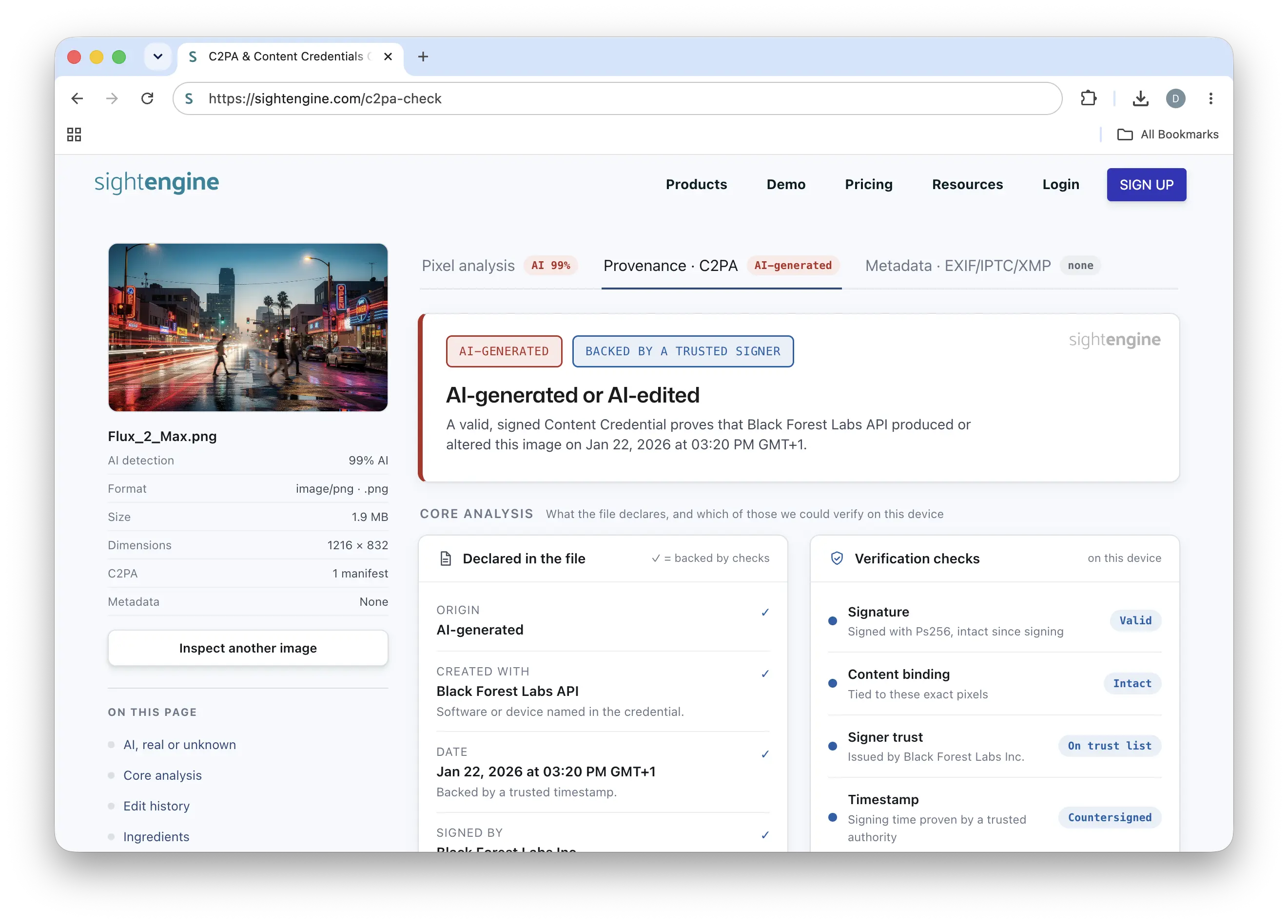 The online C2PA checker reads and validates an image's content credentials. Click to enlarge.
This is the no-code companion to our Python C2PA tutorial: same underlying validation, but with nothing to install. Drag in an image and inspect its credentials in seconds.
One important caveat: C2PA data is easily lost. Screenshots, social-media re-uploads and most image-processing operations strip it. So the absence of credentials never proves an image is authentic or human-made. This is exactly why pixel-based detection remains essential as a complement.
Online EXIF Metadata Viewer
Beyond provenance credentials, many image files contain embedded metadata. Our online EXIF metadata viewer surfaces all of it:
- Camera and device: type of camera, model and lens, along with capture settings like ISO, aperture and exposure.
- Timestamps: time of creation and last modification.
- Software: the application that last wrote the file, often revealing whether it passed through an editor.
- Location: GPS coordinates.
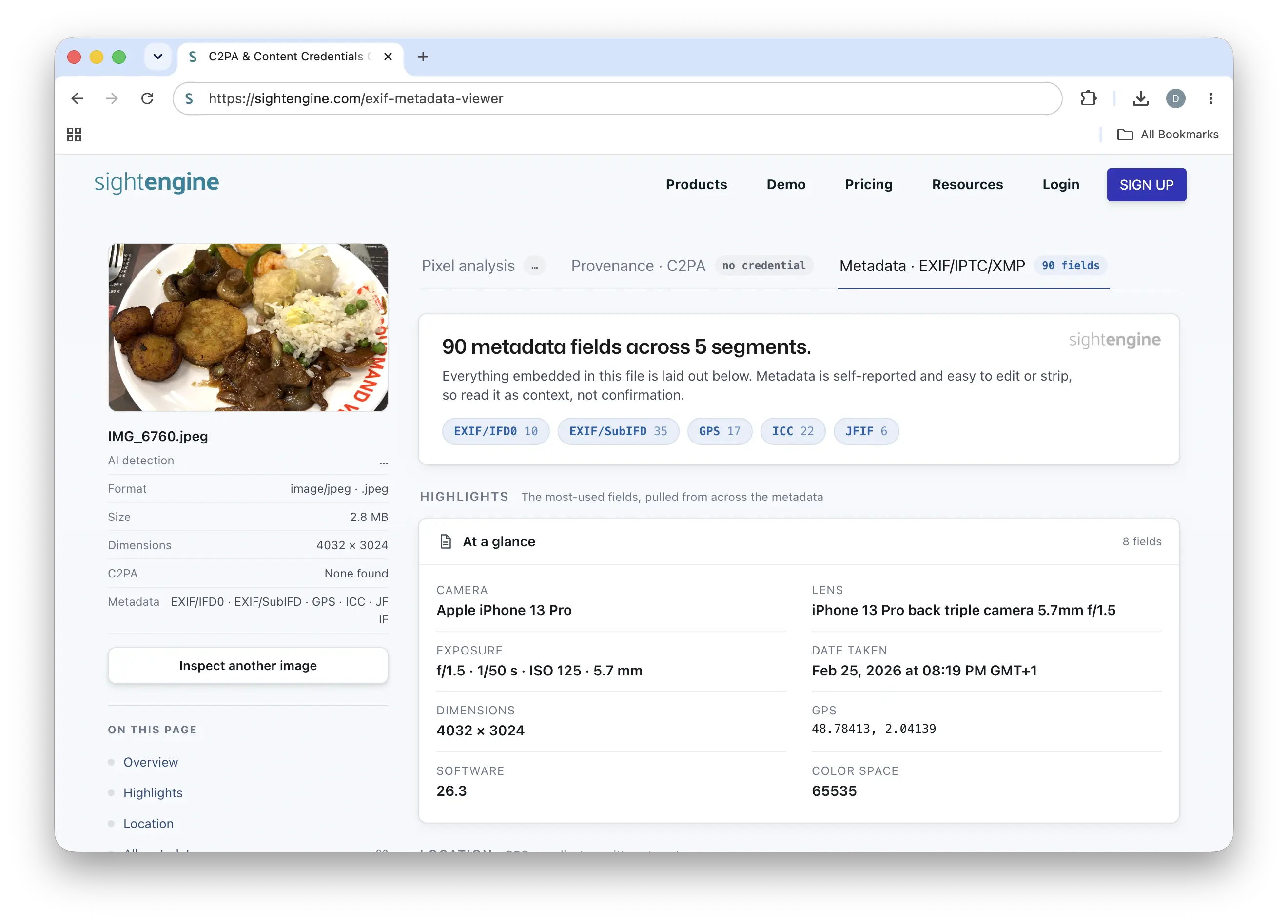 The online EXIF metadata viewer surfaces every metadata field a file carries. Click to enlarge.
For an investigator, these fields are a starting point for verification: do the timestamps line up with the claimed story? Does the device match the supposed source? Has the file been through editing software it shouldn't have? As with C2PA, metadata can be missing or deliberately altered, so it's a clue to corroborate rather than a verdict on its own.
A complete toolkit for examining media
No single signal is enough on its own. The most reliable approach is to combine them:
- Analyze the pixels. Run the image through AI-generated image detection to get a content-based verdict that doesn't depend on any metadata. Our models ranked #1 in an independent benchmark with 98.3% accuracy and return per-generator confidence scores across 20+ generators.
- Check the content credentials. Use the C2PA checker to see what the file claims about its origin and whether those claims still validate.
- Inspect the metadata. Use the EXIF metadata viewer to read the technical fingerprint and look for inconsistencies.
Whether you are a journalist reviewing sources, a fact-checker examining a viral image, a fraud or insurance analyst, or a Trust & Safety team, these tools give you fast, independent ways to check a file. For teams that need to do this at scale or without code, Sightengine Detect brings the same detection capabilities into a no-code dashboard, and the API integrates it all into your own workflows.
Try them now, they are free:
Read more

Unsafe organizations and individuals — Content Moderation
This is a guide to detecting, moderating and handling unsafe organizations and individuals.

Personal & Identity Attacks — Content Moderation
This is a guide to detecting, moderating and handling insults, personal attacks and identity attacks in texts and images.